

The G21 Mobile Game Trigger Is an Ergonomic Retractable Game Controller Worth Buying
A practical buying guide to the G21 mobile game trigger, a retractable ergonomic controller that aims to give PUBG Mobile, Call of Duty Mobile and Free Fire players a console-style edge without the bulk of a full gamepad.
SHOPTHIVA Editors
Why Mobile Game Triggers Matter for Competitive Shooters
Mobile shooters like PUBG Mobile, Call of Duty Mobile and Free Fire live and die by reaction time. On a glass touchscreen your thumbs have to cover movement, aim, fire, crouch and inventory all at once, which forces awkward claw grips and missed shots at the worst possible moment. A physical trigger solves this by mapping fire and aim buttons to capacitive pads that sit over the top edges of your phone, so your index fingers do the shooting while your thumbs handle movement and camera control.
The result feels closer to a console controller than a touchscreen. Players report faster scoped shots, smoother recoil taps and fewer accidental grenade throws once they stop trying to do everything with two thumbs. For a sub-£30 accessory, that is a genuinely useful upgrade rather than a gimmick.
Not every trigger is worth buying though. Cheap folding triggers can wobble, scratch your screen bezel or lose contact mid-fire. The G21, available on SHOPTHIVA, is designed to avoid those pitfalls with a retractable, ergonomic frame that fits a wide range of phone widths without tools.
What the G21 Gets Right That Cheap Triggers Do Not
The first thing you notice about the G21 is the build. The chassis is a spring-loaded retractable frame, so instead of a fixed clip that only fits one phone width, it expands and locks to match devices from compact Android handsets up to larger flagship phablets. That adjustability means it stays usable if you upgrade your phone next year, which most budget triggers cannot promise.
The trigger buttons themselves use a conductive silicone pad rather than a hard plastic nub. This matters because a softer pad seats more reliably on a screen protector and does not scratch bare glass over long sessions. The buttons have a short, tactile travel distance, so you feel the click without having to press hard, which keeps your index fingers relaxed across a full match.
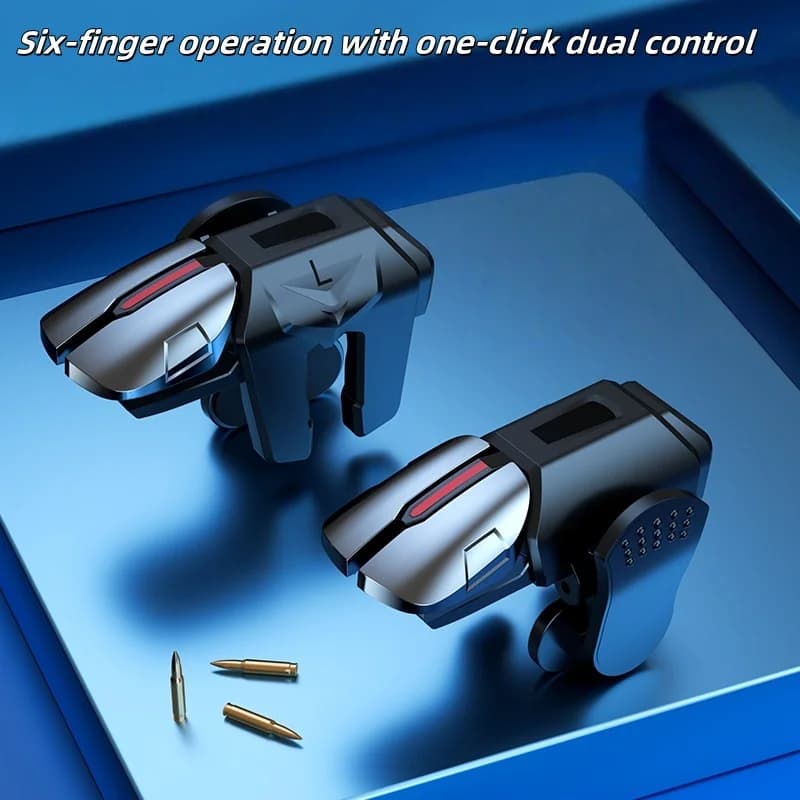
Ergonomics are the real selling point. The grip area is contoured so the controller sits between your palms naturally rather than pinching a single contact point on the phone frame. Combined with the retractable width, this lets you hold the phone the way you would a gamepad instead of cradling it with two fingers. You can see the design in the product images on the G21 listing page.
Setup and Compatibility With PUBG Mobile, Call of Duty Mobile and Free Fire
Setup is deliberately simple. You expand the G21 to the width of your phone, slot it over the top edge so the two trigger pads sit over your on-screen fire and aim buttons, then nudge the in-game button layout so each pad lines up with its target. Most players have it dialed in within a single match. No app, no Bluetooth pairing, no battery to charge, because the pads simulate a finger tap capacitively.
Compatibility is broad. The G21 works with any touchscreen shooter that lets you reposition the fire and aim buttons, which covers PUBG Mobile, Call of Duty Mobile and Free Fire as well as less mainstream titles. Because it is a passive capacitive accessory rather than an active controller, it avoids the input-recognition disputes that some games have with Bluetooth gamepads. As Polygon notes in its mobile gaming coverage, a number of competitive mobile titles still treat Bluetooth controllers inconsistently, so a physical trigger is often the safer bet.
On iOS and Android the behaviour is the same. The phone simply reads the pad as a tap, so there is no platform-specific setup. If your phone has a very curved screen edge the pad may need a slightly flatter contact zone, which is the one caveat worth checking before you buy.
How to Choose a Mobile Trigger Without Wasting Money
If you are comparing triggers, the four things that actually matter are fit, pad material, button travel and durability. Fit decides whether the controller works on your next phone, not just your current one, so a retractable frame like the G21's is preferable to a fixed-width clip. Pad material decides whether the trigger slips on a screen protector, so look for conductive silicone over hard plastic.
Button travel is about fatigue. A short, crisp click lets you tap-fire through recoil for a full 20-minute match without your fingers cramping. Durability is the long game: a metal-and-silicone frame survives being thrown in a bag, while all-plastic hinges are the part that snaps first on cheap units.
Price is the final filter. Triggers under £10 are usually single-width clips with hard plastic pads, which is fine for trying the form factor but not for regular ranked play. The G21 sits at £16.99 on SHOPTHIVA, which is the bracket where you get a retractable frame, silicone pads and a build that lasts more than a fortnight. Spend more than that and you are usually paying for branding rather than function.
Is the G21 Worth It for Your Next Ranked Session?
For most mobile shooter players the honest answer is yes, with one expectation check: a trigger will not magically make you a better shot, it removes the input friction that stops you from playing your best. If your current bottleneck is screen clutter and thumb overload, a trigger frees up your index fingers for aiming and firing, which is exactly the gap the G21 targets.
Where the G21 stands out from cheaper triggers is that it is built to keep working. The retractable frame means it is not tied to one phone, the silicone pads are kind to screen protectors, and the contoured grip lets you hold the phone like a controller instead of pinching it. At £16.99 it sits in the sweet spot where you are paying for materials and fit rather than a logo.
If you play PUBG Mobile, Call of Duty Mobile or Free Fire regularly and you are still doing everything with two thumbs on glass, the G21 is a sensible next purchase. As IGN's mobile gaming reviews point out, the gap between touchscreen play and a proper input method is one of the cheapest competitive advantages you can buy, and a trigger is the lowest-friction way to close it.
Featured in this article
Frequently asked questions
Does the G21 mobile game trigger need Bluetooth or a battery?
No. The G21 is a passive capacitive accessory, so the conductive silicone pads simulate a finger tap on your screen. There is no app to install, no Bluetooth pairing and no battery to charge. It works the moment you slot it onto your phone.
Will the G21 fit my phone?
The G21 uses a spring-loaded retractable frame that expands to match a wide range of phone widths, from compact Android handsets to larger flagship devices. The one thing to check is whether your screen has a very curved edge, since the trigger pads need a reasonably flat contact zone to register taps reliably.
Is a mobile game trigger allowed in PUBG Mobile, Call of Duty Mobile and Free Fire?
Physical capacitive triggers that simply tap the screen are generally treated the same as using your finger, and are widely used in the mobile shooter community. Active controllers that inject inputs or run macros are a different matter. If you play in a tournament with specific hardware rules, check the organiser's policy before using any external input device.
Can I use the G21 with a screen protector?
Yes. The conductive silicone pads are softer than hard plastic trigger tips, so they seat well on tempered glass and film screen protectors without scratching. If your protector is unusually thick, you may need to press slightly more firmly for the first few matches until the pad settles in.
Product gallery
Further reading